
Introduction and Purpose
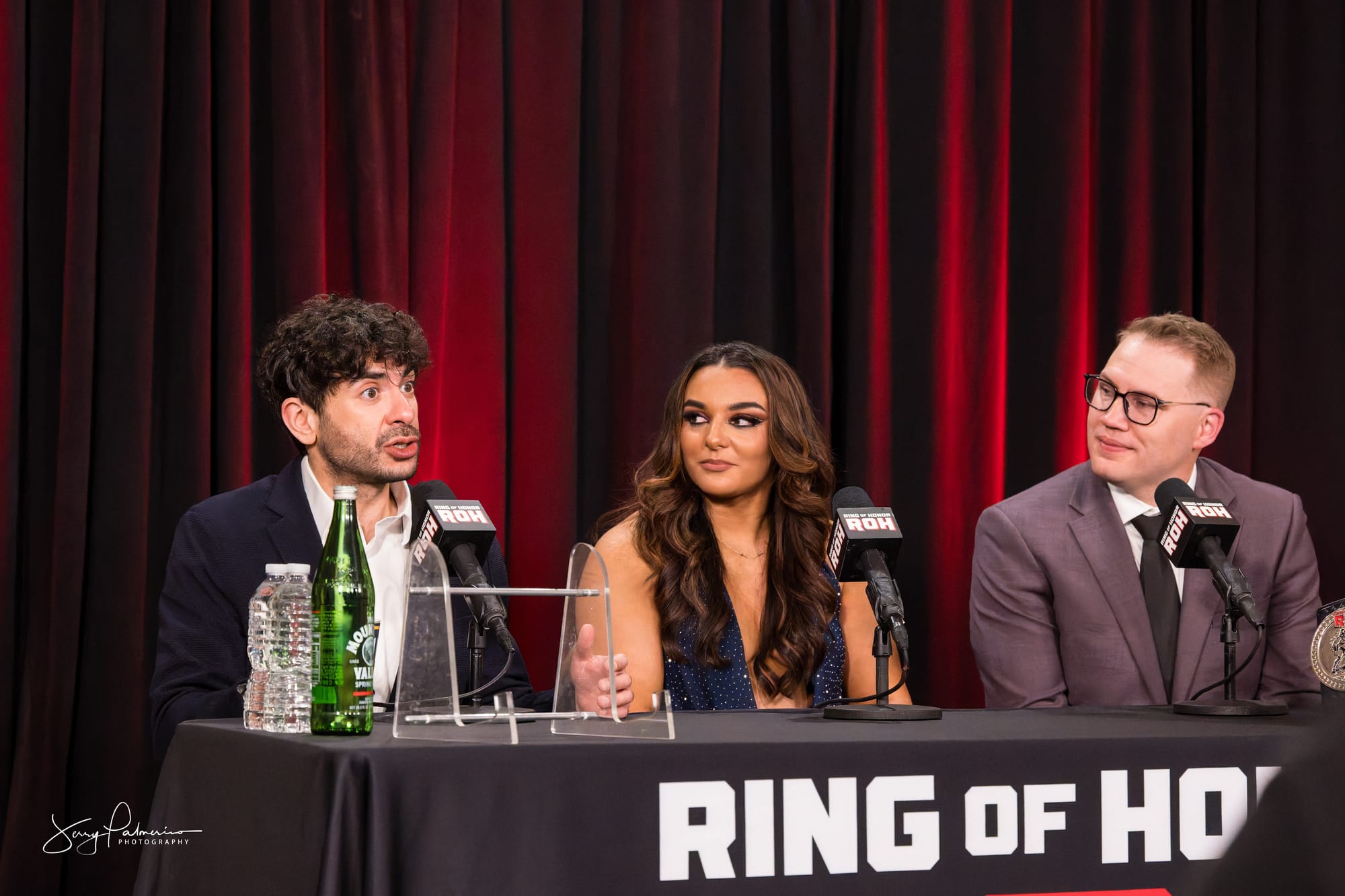
At the ROH Supercard of Honor press conference, I stood up to ask my question. Nobody corrected me. The talent answered, the moderator moved to the next hand, and the session rolled forward without comment. I knew inside of two seconds that I had marked myself as new to the room. Every seated reporter around me had stayed in their chair, waited for the runner to bring the microphone, and asked from a sitting position. Standing put my head into the sightline of two video cameras and signaled that I wanted attention rather than an answer.
That is the kind of thing nobody tells you in advance. The technical parts of covering a press conference are easy to learn. The etiquette is not written down anywhere, and it gets enforced through quiet judgment rather than through correction. This piece covers how the room actually operates, including some of the vocabulary that gets thrown around without explanation: how to get in, where to sit, how to shoot without disrupting audio, how to construct and deliver a question, and which behaviors mark a working journalist apart from a fan holding a camera.
Prerequisites and Tools
Credential and confirmation. Your RSVP email or credential confirmation is your entry. Print it or keep it accessible offline, because arena press rooms and back-of-house corridors have unreliable signal. Carry photo ID.
Outlet identification. Business cards with the publication name, your name, and a working email. You will need to identify your outlet out loud when you ask a question, and you will want to hand a card to the media relations contact before you leave.
Notebook and pen. Not optional. Batteries fail and recorders fill up. Handwritten notes also let you mark timecodes and flag quotes worth pulling.
Audio recorder. A phone in airplane mode with the recorder running works. Set it on the table or hold it low. Larger venues sometimes run a mult box, a small metal box near the podium with a row of audio jacks coming off the house microphone. Instead of forty reporters crowding the table with forty separate recorders, everyone plugs into the box and gets the same clean feed straight from the mic, with no room noise or crowd chatter mixed in. Ask the media contact whether one is available and whether you can patch into it.
Camera bodies and glass. A 24-70 f2.8 handles the wide room and the two-shot on the dais, the raised platform or elevated table where the speakers sit so the room can see them. A 70-200 f2.8 gives you tight singles from the back without moving. On Nikon Z bodies, set silent shutter before you walk in, not after the first question.
Prepared questions. Two written out, one primary and one backup. Research who is on the dais, how their names are pronounced, and what has already been announced in the press release.
Core Lesson and Step-by-Step Breakdown
Step one: confirm before you travel. Reply to the media invitation even when it does not require a reply. Ask three things: call time, whether still photography is permitted during the Q&A, and whether there will be one-on-one availability afterward, a short individual interview slot granted after the group session ends. That third question changes your entire plan for the day.
Step two: arrive thirty minutes early. Sign in. Find the media relations contact and introduce yourself by name and outlet. This is the person who decides whether you get a one-on-one later, and whether you get invited back. Wear your credential where it can be seen. Scout the room before it fills: locate the dais, the backdrop, the video camera positions, and the power outlets. Larger events sometimes set up a step-and-repeat, the branded backdrop with repeating logos used for arrival and portrait photos, off to one side. That is a separate shooting opportunity from the dais itself.
Step three: choose your position deliberately. If the room is seated theater-style, take an aisle seat in the second or third row on the side opposite the main video bank. You get a clean angle across the dais, you can step into the aisle to shoot without climbing over anyone, and you stay out of the broadcast frame. If the room is standing-room, photographers work the back riser, a raised platform built specifically for cameras, or a designated shooting area at the front. Ask which one applies rather than guessing.
Step four: shoot the opening statement, not the Q&A. Most of your usable frames come during the prepared remarks, when speakers are animated and the room expects camera noise. Work the burst then. Once the Q&A starts, the audio matters more than your frame count, and a mechanical shutter firing during a quiet answer is the fastest way to earn a look from the video crew.
Step five: raise your hand and wait. Keep your hand up at shoulder or head height. Stay seated. The moderator calls on you, a runner brings the microphone, and you speak only once you have it. If the moderator does not know you, catch their eye during a lull before the session starts and introduce yourself so your name is in their head.
Step six: identify, then ask. The formula is short. Your name, your outlet, the person you are addressing, the question. “Jerry Palmerino, PhotoSlammers Media. This is for the champion.” Then one question. Not three questions stacked into one turn.
Step seven: follow up once, then yield. A single follow-up is standard and expected when the first answer opens something. A second follow-up is you monopolizing a shared resource. Hand the microphone back and stop talking.
Step eight: work the scrum, the loose cluster of reporters that forms around a subject once the formal session ends. Most of the material you will actually use comes out of this, when smaller groups form and the answers get longer because the competitive pressure of the open room is gone. Stay for it. This is also where you shoot tighter, more candid frames.
Step nine: close the loop. Thank the media contact by name on your way out. Email them the published link the following day. That single habit does more for your access over a season than anything else on this list.
Real-World Demonstrations and Examples
A wrestling promotion announcing a card. Ballroom or arena club level, riser dais, step-and-repeat backdrop, LED panel behind the table. Two talents and an executive seated. Practical exposure: 1/250 at f2.8, ISO 3200 to 6400 depending on the house lights. Watch the LED panel for color shift and banding. If the panel is pulsing at a rate that fights your shutter, move to 1/125 and steady yourself against a chair back rather than pushing ISO higher. No flash. The room is being recorded for the promotion’s own channels, and a strobe in the middle of a talent’s answer is remembered.
A minor league club announcing a signing. Small conference room, fluorescent overhead, maybe a window on one wall. Six chairs, one table, a pull-up banner. Everyone stands because there is nowhere to sit. Standing here is correct, because standing is what the room is doing. That is the whole rule: match the room. Shoot wide first to establish the setting with the banner legible, then work the 70-200 for the singles.
A motorsports media availability in the paddock. Outdoors, no chairs, a roving microphone, ambient noise from generators and practice sessions. Reporters cluster in a semicircle and speak up when the moderator points. Nobody sits. Your audio recorder needs to be close, and wind noise will destroy a phone mic without a cover. Exposure moves fast between shade and open sun, so meter for the subject’s face and let the background go where it goes.
Common Pitfalls and Troubleshooting
Standing when the room is seated. My own mistake. The correction is to read the room in the first ninety seconds and match it.
The multi-part question. Asking three things at once means the subject answers the easiest one and skips the rest. Ask the one you actually need.
The speech. Some reporters use their turn to demonstrate what they know. The subject stops listening, the room stops listening, and the answer you get is a courtesy. Keep the question under twenty words when you can.
Burning your exclusive in public. If you have a line of inquiry nobody else has, do not hand it to the entire press corps by asking it into an open microphone. Save it for the scrum or the one-on-one.
Fan behavior. No autographs. No selfies. No merchandise brought in for signing. No cheering, no applause, no reacting to an announcement. Wrestling coverage in particular tests this, because the people on the dais are performers you may have watched for years. A press conference is a work environment. Treat it as one and you get invited back.
Phone noise. Silence it before you walk in, not when it rings.
Blocking a camera. Video positions are locked and their operators cannot move. Walk behind them, never in front, and never set a bag in their frame.
Asking what the release already answered. Read the material handed to you at check-in before the session starts.
Arriving late. Rooms lock at call time in some venues. A late arrival walking to a seat during opening remarks is disruptive and gets noticed.
Best Practices and Pro Tips
Never say “presser.” Say press conference, or news conference. The shortened form is casual newsroom slang that reads as an affectation when it comes from someone building a reputation, and it looks worse in published copy than it sounds in conversation. Use the full term in writing, in email, in your captions, and out loud.
Write your question down and read it aloud before you leave the house. A question that sounds clean in your head often runs long when spoken. Cutting it on paper is easier than cutting it with a live microphone in your hand.
Get the room, not only the dais. A wide frame showing the backdrop, the seated press, and the setting gives an editor context and gives your article a lead image that is not another head-and-shoulders at a table. Shoot the empty dais with the banner before anyone sits down.
Confirm name spellings with the media contact before you file. Ask for the exact title and the exact organization name. Getting a name wrong in a caption is the error that follows you.
Caption at ingest. Apply your IPTC template in Photo Mechanic while the details are fresh, including the venue name, city, state, and date. Waiting until the drive home means guessing at a title you heard once.
Sit where you can leave. An aisle seat lets you move for a better angle and lets you slip out for the scrum without climbing over a row.
Learn the moderator’s name and use it. Recognition in that chair is how you get called on in a crowded room.
Closing Summary
A press conference rewards preparation and quiet competence far more than aggression. The mechanics are simple enough: confirm your access ahead of time, arrive early and introduce yourself, position where you can shoot without interfering with video, work your frames during the prepared remarks, then set the camera down and pay attention when the Q&A starts. Stay seated if the room is seated. Identify yourself and your outlet, ask one question, take one follow-up, and hand back the microphone. Save your best line of inquiry for the smaller group afterward, where you will get a real answer. Behave as a working journalist rather than as an enthusiast with credentials, and keep the language professional, starting with calling the thing by its actual name. The photographers and reporters who get called on next time are the ones who made the room easier to run.
Watch the press conference on YouTube